
'%3e%3cg%20clip-path='url(%23b)'%3e%3cpath%20fill='%23fff'%20d='M.5%200h24v18H.5z'/%3e%3cpath%20fill='%23F7FCFF'%20fill-rule='evenodd'%20d='M.5%200h24v18H.5z'%20clip-rule='evenodd'/%3e%3cpath%20fill='%23E31D1C'%20fill-rule='evenodd'%20d='M.5%2011v1.5h24V11zM.5%2013.75v1.5h24v-1.5zM.5%205.5V7h24V5.5zM.5%2016.5V18h24v-1.5zM.5%208.25v1.5h24v-1.5zM.5%200v1.5h24V0zM.5%202.75v1.5h24v-1.5z'%20clip-rule='evenodd'/%3e%3cpath%20fill='%232E42A5'%20d='M.5%200h15v9.75H.5z'/%3e%3cpath%20fill='%23F7FCFF'%20fill-rule='evenodd'%20d='m4.791%202.204-.544.382.184-.68-.484-.43h.632L4.79.922l.248.554h.538l-.423.43.164.68zm-3%200-.544.382.184-.68-.484-.43h.632L1.79.922l.248.554h.538l-.423.43.164.68zm5.456.382.544-.382.527.382-.164-.68.423-.43H8.04L7.791.922l-.212.554h-.632l.484.43zm3.544-.382-.544.382.184-.68-.484-.43h.632l.212-.554.248.554h.539l-.424.43.164.68zM1.247%205.586l.544-.382.527.382-.164-.68.423-.43H2.04l-.248-.554-.212.554H.947l.484.43zm3.544-.382-.544.382.184-.68-.484-.43h.632l.212-.554.248.554h.538l-.423.43.164.68zm2.456.382.544-.382.527.382-.164-.68.423-.43H8.04l-.248-.554-.212.554h-.632l.484.43zm3.544-.382-.544.382.184-.68-.484-.43h.632l.212-.554.248.554h.539l-.424.43.164.68zM1.247%208.586l.544-.382.527.382-.164-.68.423-.43H2.04l-.248-.554-.212.554H.947l.484.43zm3.544-.382-.544.382.184-.68-.484-.43h.632l.212-.554.248.554h.538l-.423.43.164.68zm2.456.382.544-.382.527.382-.164-.68.423-.43H8.04l-.248-.554-.212.554h-.632l.484.43zm3.544-.382-.544.382.184-.68-.484-.43h.632l.212-.554.248.554h.539l-.424.43.164.68zm2.456-5.618.544-.382.527.382-.164-.68.424-.43h-.539l-.248-.554-.212.554h-.632l.484.43zm.544%202.618-.544.382.184-.68-.484-.43h.632l.212-.554.248.554h.539l-.424.43.164.68zm-.544%203.382.544-.382.527.382-.164-.68.424-.43h-.539l-.248-.554-.212.554h-.632l.484.43zM3.291%203.704l-.544.382.184-.68-.484-.43h.632l.212-.554.248.554h.538l-.423.43.164.68zm2.456.382.544-.382.527.382-.164-.68.423-.43H6.54l-.248-.554-.212.554h-.632l.484.43zm3.544-.382-.544.382.184-.68-.484-.43h.632l.212-.554.248.554h.539l-.424.43.164.68zM2.747%207.086l.544-.382.527.382-.164-.68.423-.43H3.54l-.248-.554-.212.554h-.632l.484.43zm3.544-.382-.544.382.184-.68-.484-.43h.632l.212-.554.248.554h.538l-.423.43.164.68zm2.456.382.544-.382.527.382-.164-.68.424-.43h-.539l-.248-.554-.212.554h-.632l.484.43zm3.544-3.382-.544.382.184-.68-.484-.43h.632l.212-.554.248.554h.539l-.424.43.164.68zm-.544%203.382.544-.382.527.382-.164-.68.424-.43h-.539l-.248-.554-.212.554h-.632l.484.43z'%20clip-rule='evenodd'/%3e%3c/g%3e%3c/g%3e%3cdefs%3e%3cclipPath%20id='a'%3e%3crect%20width='24'%20height='18'%20x='.5'%20fill='%23fff'%20rx='3'/%3e%3c/clipPath%3e%3cclipPath%20id='b'%3e%3cpath%20fill='%23fff'%20d='M.5%200h24v18H.5z'/%3e%3c/clipPath%3e%3c/defs%3e%3c/svg%3e)


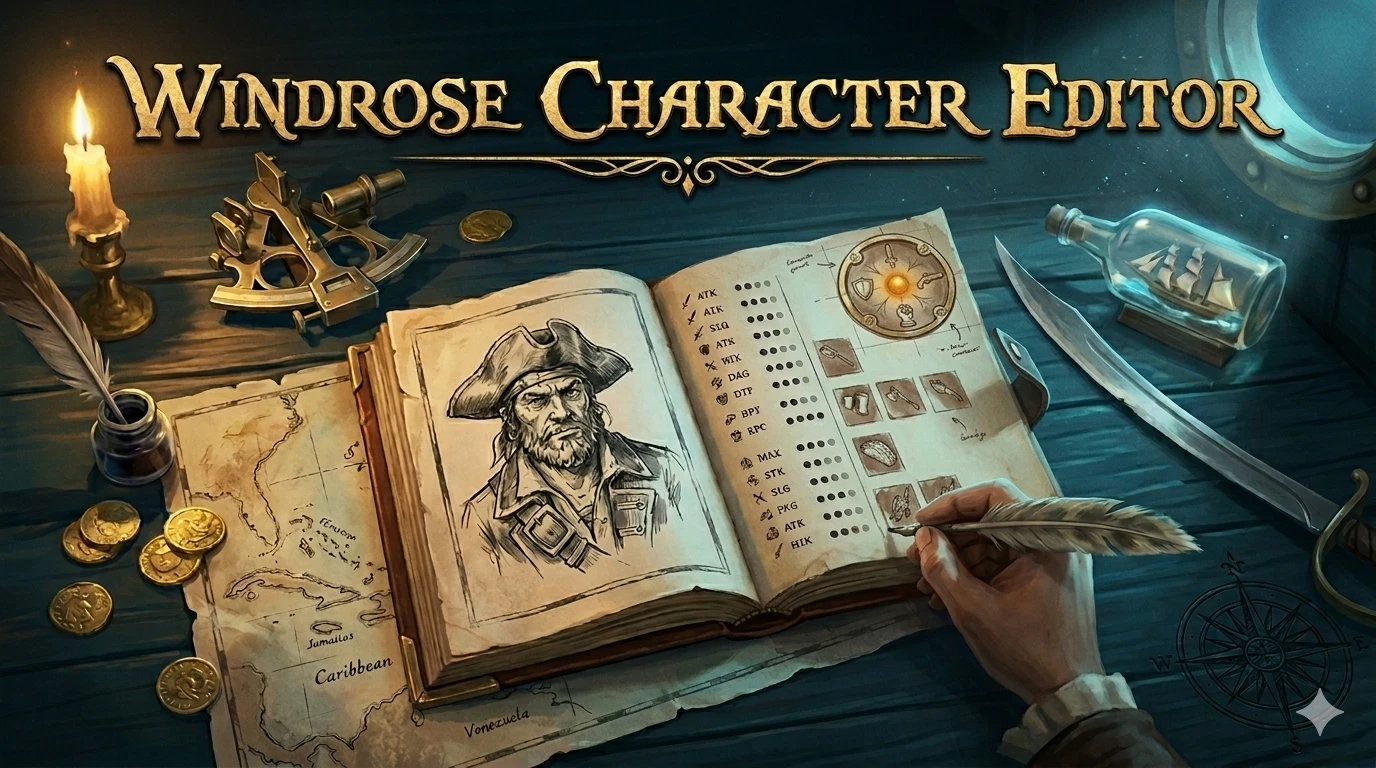
Windrose Character Editor
Creator: Carrumbum
Updated:22/05/2026 23:55:06
363.9MB

Trusted by 200,000,000+ Users
About this Mod
Local editor for your Windrose character save — stats, talents, inventory, ships. Auto-backup, live PAK-derived stats, undo/redo. No telemetry. - Github - https://github.com/Chris971991/windrose-character-editor-releases
Official GitHub Page
⚠ READ FIRST: Disable Steam Cloud for Windrose
Since the May 4th game update, Windrose saves are now managed by an internal checkpoint system. If Steam Cloud is enabled, any edits you make will be silently reverted the next time you launch the game.
To disable: Steam → right-click Windrose → Properties → General → Uncheck Keep game saves in the Steam Cloud. If Steam asks about a conflict, pick "Use Local Files".
This is a one-time setup. Without it, the editor cannot reliably save changes.
What It Does
Screenshots
Full Character tab. Talent radial, derived stats, action bar, and main inventory all on one page.
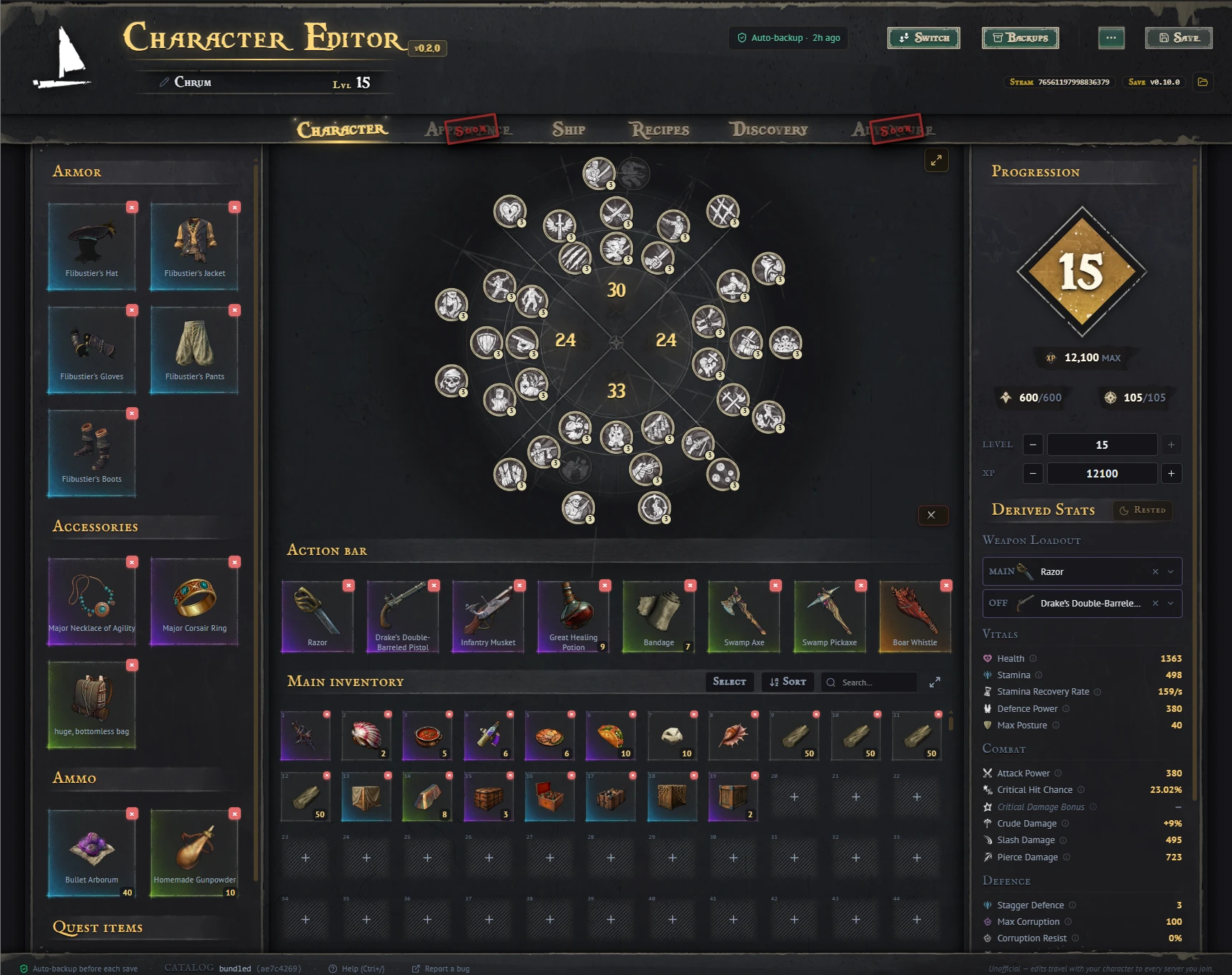
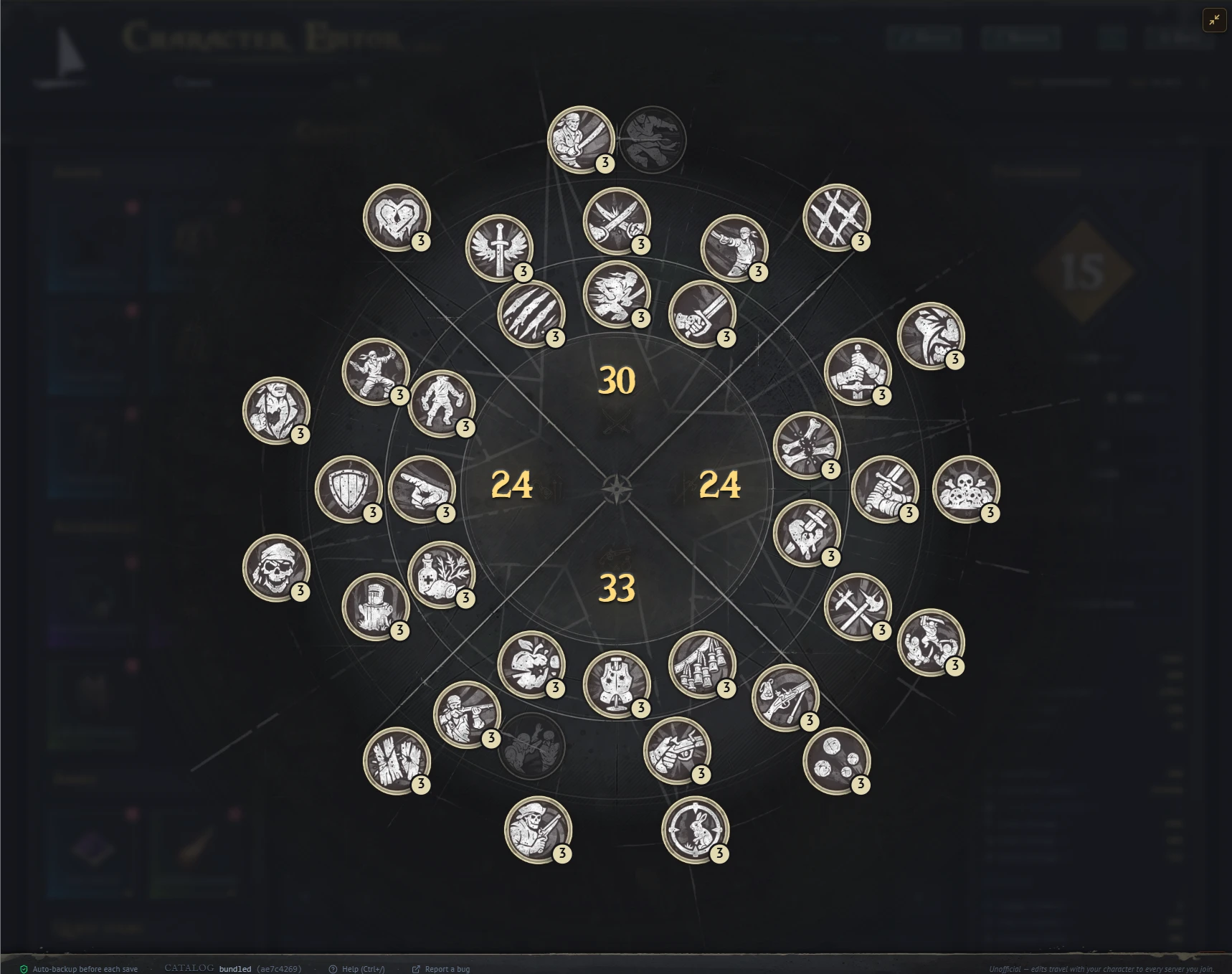
The talent tree is a faithful port of the in-game radial menu. It features the game’s own parchment background, slot frames, and 51 individual talent icons taken directly from the game files. Hovering over a talent displays the current rank effect alongside the next rank effect for easy comparison.
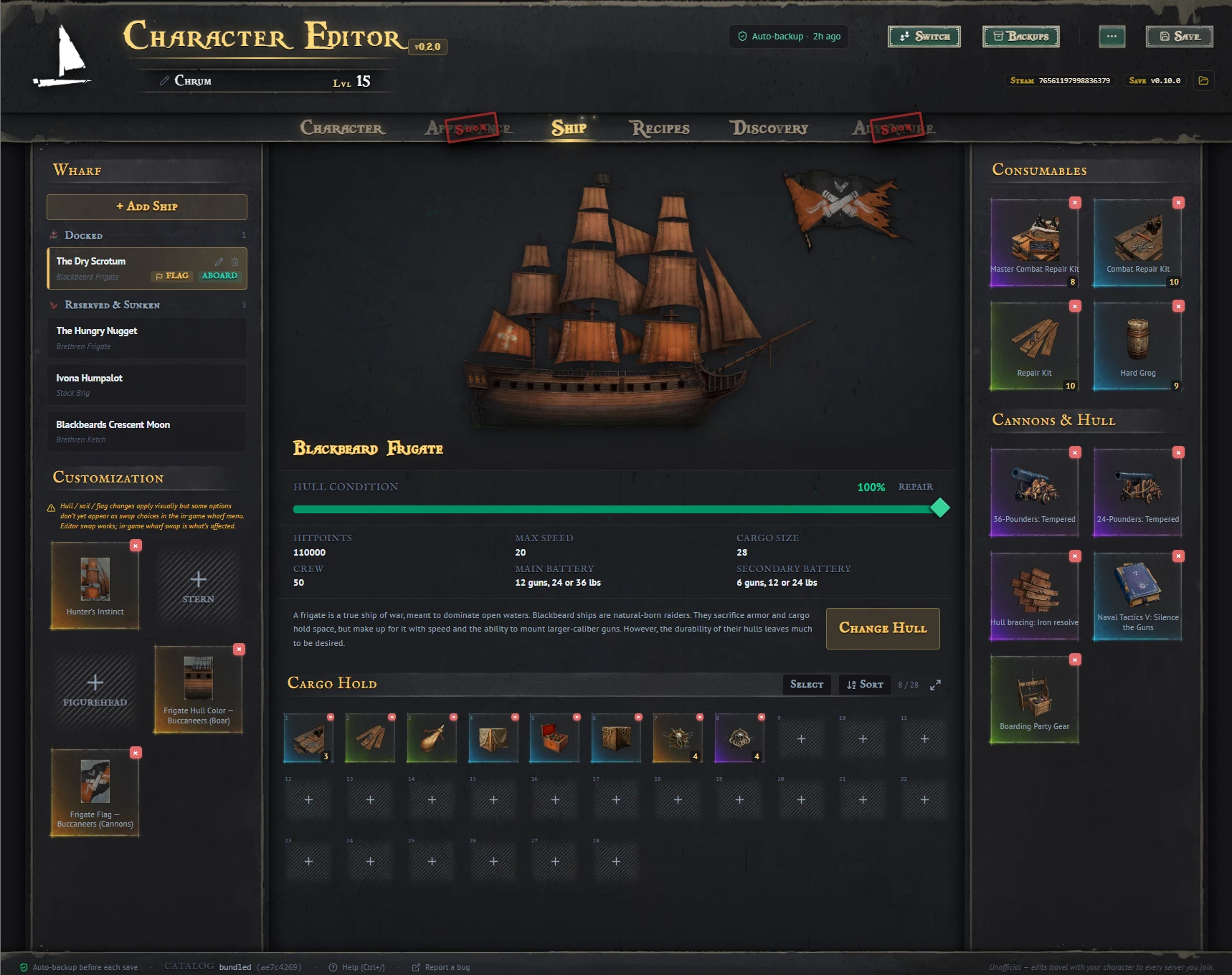
**Ship Tab** Photorealistic layered hull, sail & flag preview using in-game textures. Swap hulls, edit cannons & crew, manage cargo, repair, set as flagship.
Each customization slot opens its own picker, organized by faction pack, so you can mix and match looks across every style book you've unlocked.
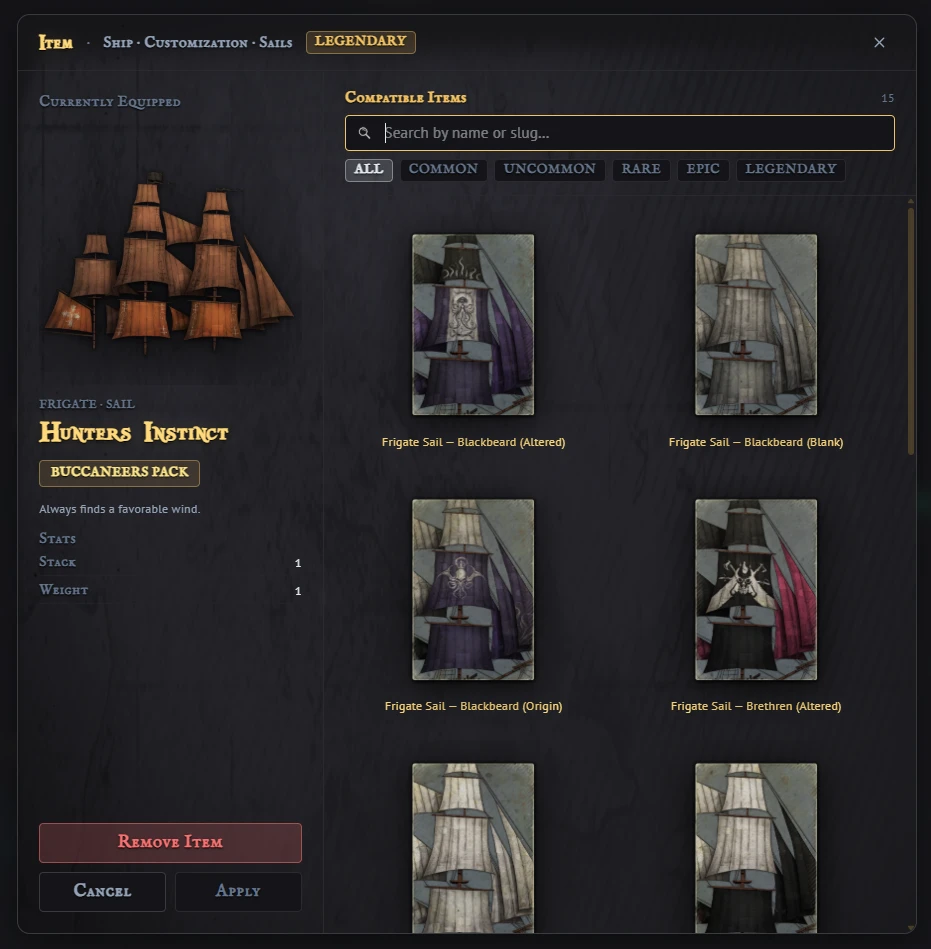
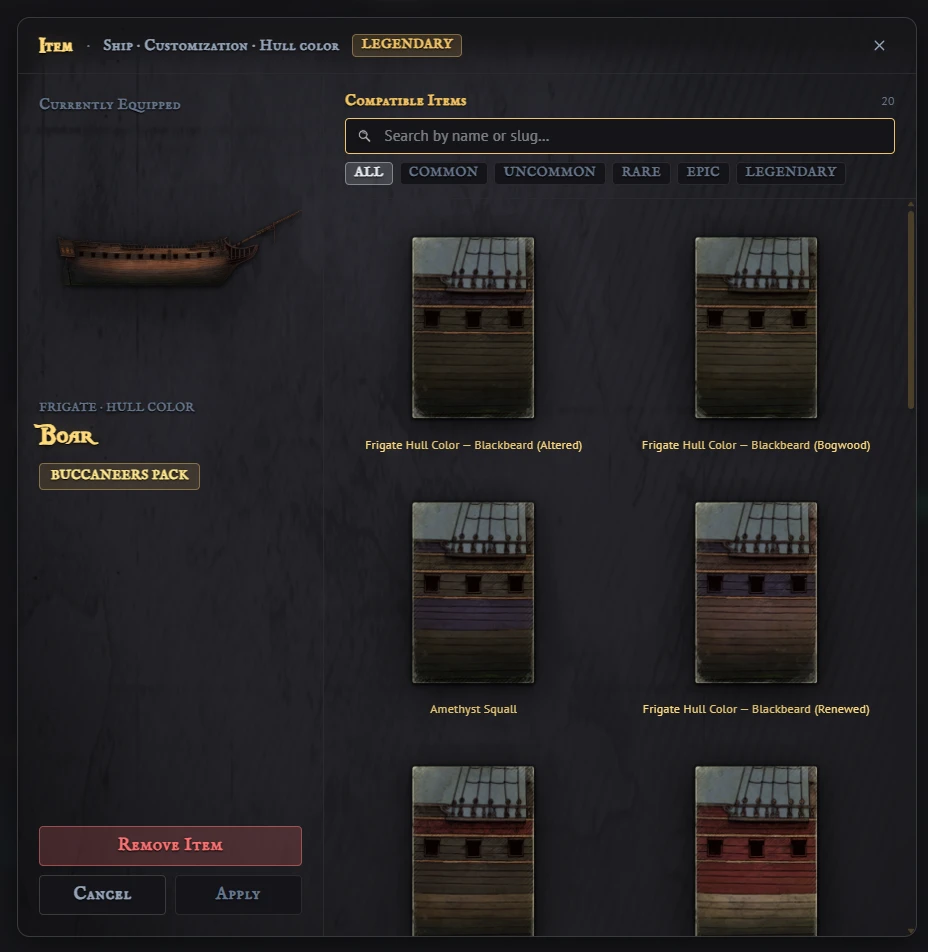
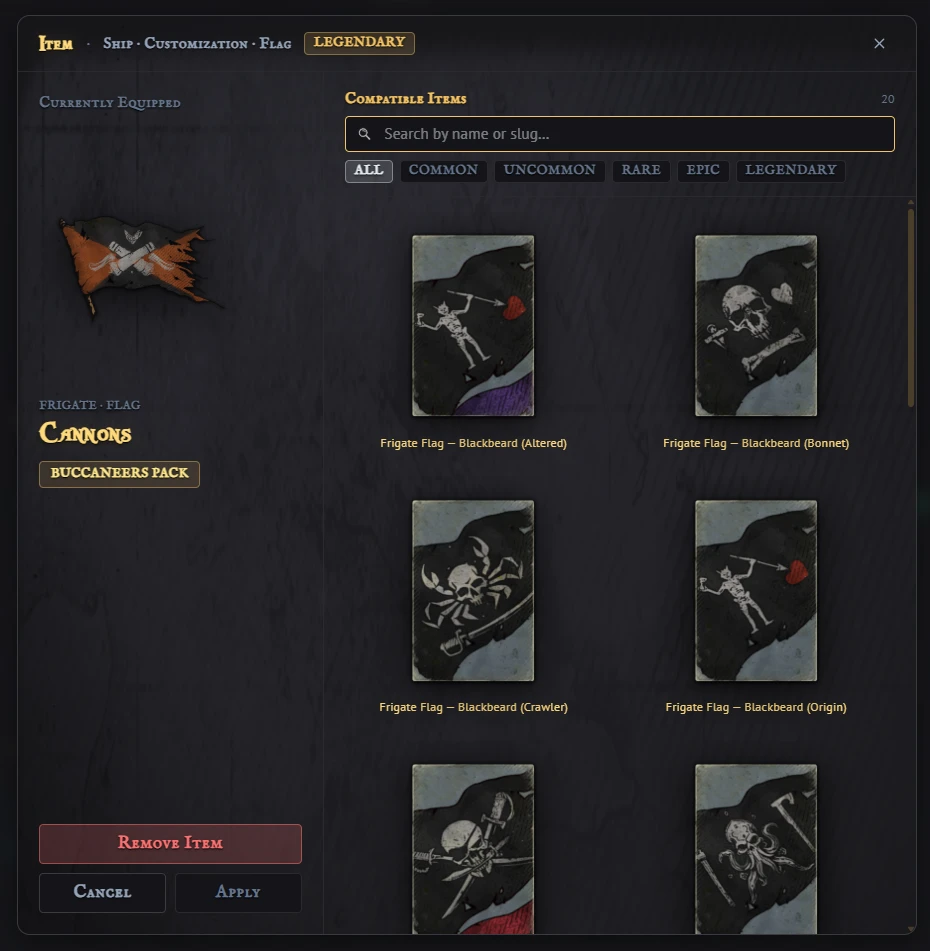
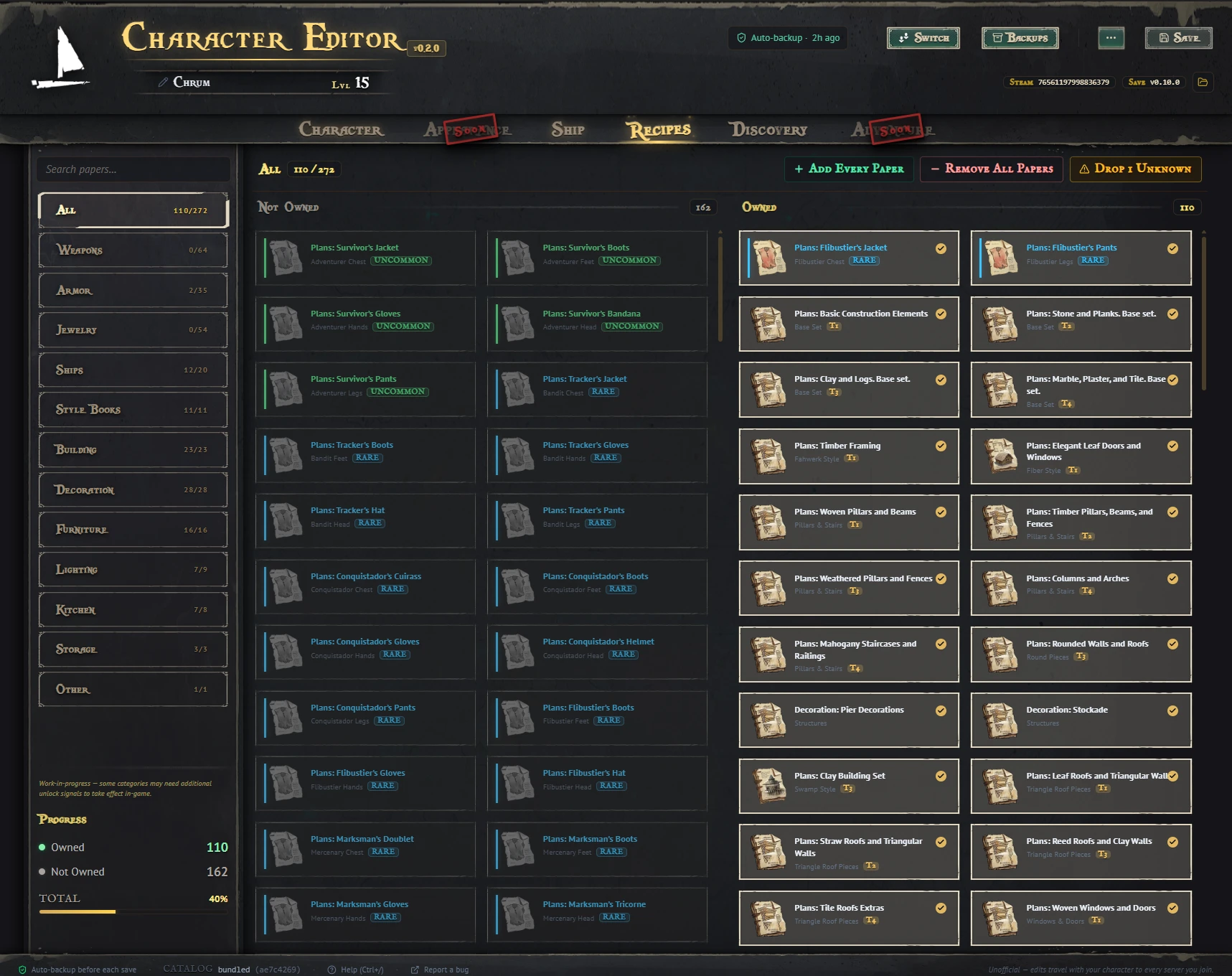
The Recipes tab. Lock or unlock any recipe paper, with search, category filters, and bulk actions for whole categories at a time.
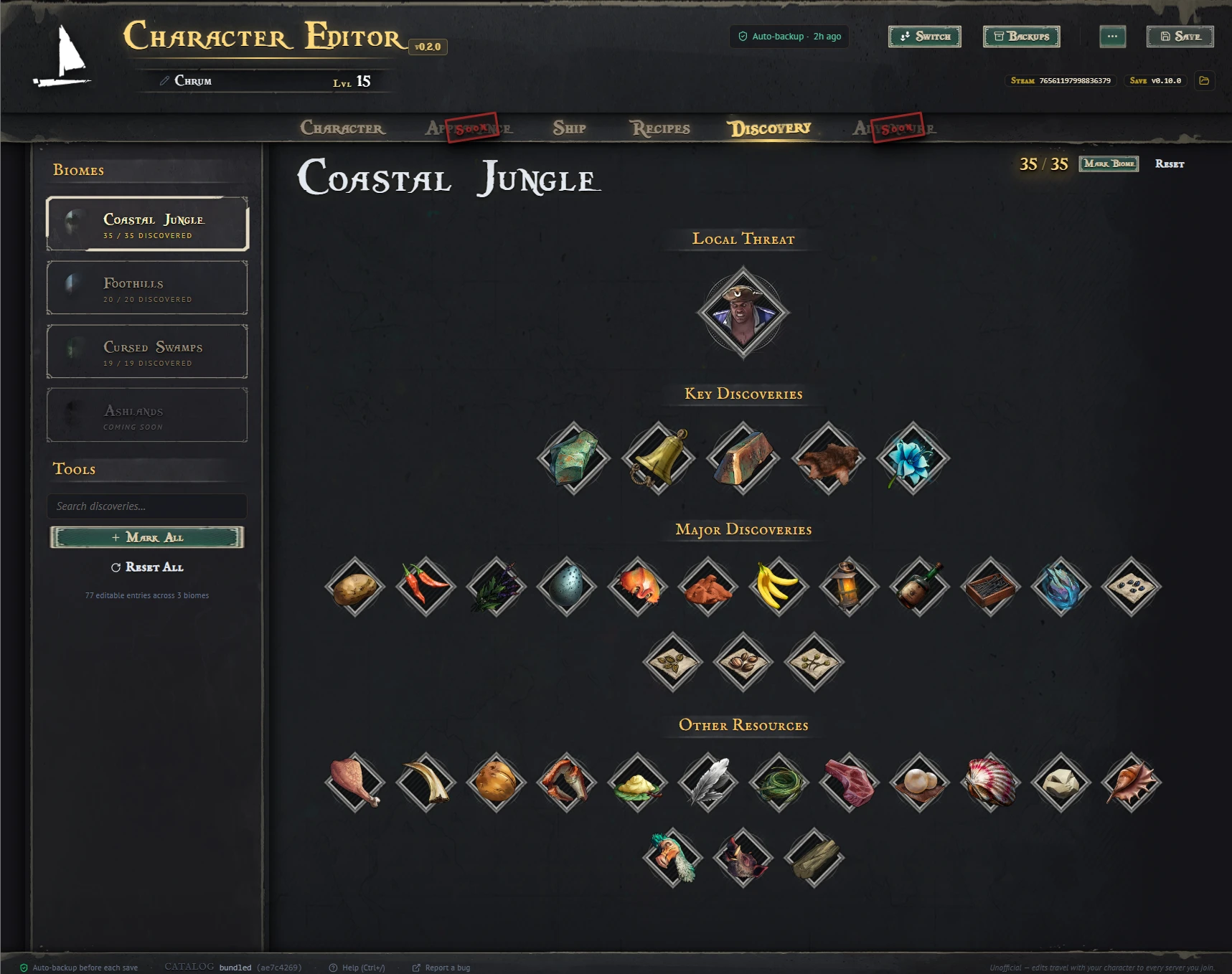
The Discovery tab. Layout matches the in-game UI exactly, with rich PAK-extracted descriptions on hover and per-character progression locks.
(More screenshots in the Images **tab — backups modal, multi-character picker, hover tooltips, etc.)**
Install
You don't need .NET, Python, or any modding toolchain. Just install Windrose via Steam.
Windows SmartScreen warningWindows will say "Windows protected your PC" the first time. Click More info → Run anywayThe .exe is not yet code-signed (paid certificate is on the to-do list).
Important things to know
Steam Cloud must be disabled. See the warning at the top of this page. Without it, your edits will be silently reverted on the next game launch.
Save before closing Windrose. The editor refuses to write while the game has the save file open. The header shows a yellow **"Game running — close to save"** Pill when this is the case.
Edits travel with your character. Your character (stats, talents, inventory, ships) is saved locally and carried across every server you join. Any changes you make here will stay with you when you enter a friend’s world or a community server. Please be respectful of other players and follow each server’s rules.
Auto-save before each save. Each save first creates a timestamped copy of your save folder. You can restore any of them at any time from the Backups browser in the editor.
Round-trip self-check. Before applying any edit, the parser re-serializes the unmodified blob. If the bytes don't match exactly, it bails. This catches parser bugs that would otherwise silently corrupt a save.
Save won't load? If you see a "Couldn't find a Windrose save" or migration-failed message, check the Help menu for details. Repair save folder Tool that diagnoses and fixes the most common post-patch issues (v1↔v2 mirror gaps, missing player directories, etc.).
Keyboard Shortcuts
Compatibility
Bugs, ideas, feature requests
Drop them in the Bugs / Posts tabs here on Nexus, or open an issue on GitHub: github.com/Chris971991/windrose-character-editor-releases/issues
If a save fails, the editor offers to copy a diagnostic JSON to your clipboard. Paste that into the issue and it gives me everything I need to reproduce. The Help menu also has a Download diagnostic log button — drop the .log into your issue or Discord post.
**Privacy**
No telemetry, no analytics, no phone-home. The editor only contacts GitHub for update checks and gaming.tools for item icon and cosmetic-string fetches. All save data is processed locally on your machine.
Edit your character's stats, talents, gear, ships, recipes, and discoveries — no manual save file editing needed.
Official GitHub Page
⚠ READ FIRST: Disable Steam Cloud for Windrose
Since the May 4th game update, Windrose saves are now managed by an internal checkpoint system. If Steam Cloud is enabled, any edits you make will be silently reverted the next time you launch the game.
To disable: Steam → right-click Windrose → Properties → General → Uncheck Keep game saves in the Steam Cloud. If Steam asks about a conflict, pick "Use Local Files".
This is a one-time setup. Without it, the editor cannot reliably save changes.
What It Does
- Character — Rename, change level + XP, edit all 6 stats (Strength / Agility / Precision / Mastery / Vitality / Endurance), distribute points across the full talent tree
- Inventory — Swap any item, adjust quantity, set equipment level 1–15
- Ships — Swap hulls, edit cannons, sails, hull plates, and boarding crew; manage cargo and consumables; set the flagship; repair damage; add new ships to your fleet; delete unwanted ones.
- Customization — Mix and match sails, hull colors, and flags from every faction style book you've unlocked (Stock, Brethren, Blackbeard, Buccaneers, Smugglers, Corsairs)
- Recipes — Toggle every recipe your character has learned across cooking, alchemy, building, ship gear, and more. Search, filter by category, or bulk-unlock entire categories.
- **Discovery** — Track every biome's discoveries (89 entries across Coastal Jungle, Foothills, Cursed Swamps, Ashlands). Layout matches the in-game UI exactly, same sections, same order, same boss progression locks (defeat the previous boss to unlock the next biome). Hover any tile for full game description, effects, vanity text. Bulk actions auto-skip locked biomes. Ashlands shows "Coming Soon" with an animated hourglass since the devs haven't released its content yet
- Live Derived Stats — Health, Defense Power, Critical Hit Chance, weapon damage, etc., are recalculated from the game's actual PAK math as you edit, so you see the real impact of every change before you save. Strength, Agility, and Precision now correctly affect damage based on each weapon's hidden grade letter (S/A/B/C).
- Undo / Redo — Every edit is history-tracked (Ctrl+Z / Ctrl+Y); slider drags collapse into single steps.
- Build presets — Export your current edits as a JSON file to share with friends or reapply later.
- Backups — Auto-snapshot before every save, restore with preview, per-row notes, one-click pruning, restore with safety snapshot
- Hot-patch catalog — When WindRose is patched between editor builds, the editor pulls the latest PAK data from GitHub on demand, so you don't need to wait for a new release.
- Auto-Updates — Opt-in update prompts via GitHub releases (no need to return to Nexus unless performing a fresh reinstall)
- No telemetry — local-only, no analytics, no phone-home
Screenshots
Full Character tab. Talent radial, derived stats, action bar, and main inventory all on one page.
The talent tree is a faithful port of the in-game radial menu. It features the game’s own parchment background, slot frames, and 51 individual talent icons taken directly from the game files. Hovering over a talent displays the current rank effect alongside the next rank effect for easy comparison.
**Ship Tab** Photorealistic layered hull, sail & flag preview using in-game textures. Swap hulls, edit cannons & crew, manage cargo, repair, set as flagship.
Each customization slot opens its own picker, organized by faction pack, so you can mix and match looks across every style book you've unlocked.
The Recipes tab. Lock or unlock any recipe paper, with search, category filters, and bulk actions for whole categories at a time.
The Discovery tab. Layout matches the in-game UI exactly, with rich PAK-extracted descriptions on hover and per-character progression locks.
(More screenshots in the Images **tab — backups modal, multi-character picker, hover tooltips, etc.)**
Install
- Download from the Files tab. Two options:
- Installer (recommended) — install wizard, Start Menu + desktop shortcuts, auto-updates on future releases. Per-user install, no admin required.
- Portable — Single .exe. Runs from anywhere (including USB drives), no install required. Will not auto-update — manually download future versions from this page.
- Run the installer (or the portable .exe). On first launch, the editor will guide you through its features.
- Edit. Save. Launch Windrose to verify.
You don't need .NET, Python, or any modding toolchain. Just install Windrose via Steam.
Windows SmartScreen warningWindows will say "Windows protected your PC" the first time. Click More info → Run anywayThe .exe is not yet code-signed (paid certificate is on the to-do list).
Important things to know
Steam Cloud must be disabled. See the warning at the top of this page. Without it, your edits will be silently reverted on the next game launch.
Save before closing Windrose. The editor refuses to write while the game has the save file open. The header shows a yellow **"Game running — close to save"** Pill when this is the case.
Edits travel with your character. Your character (stats, talents, inventory, ships) is saved locally and carried across every server you join. Any changes you make here will stay with you when you enter a friend’s world or a community server. Please be respectful of other players and follow each server’s rules.
Auto-save before each save. Each save first creates a timestamped copy of your save folder. You can restore any of them at any time from the Backups browser in the editor.
Round-trip self-check. Before applying any edit, the parser re-serializes the unmodified blob. If the bytes don't match exactly, it bails. This catches parser bugs that would otherwise silently corrupt a save.
Save won't load? If you see a "Couldn't find a Windrose save" or migration-failed message, check the Help menu for details. Repair save folder Tool that diagnoses and fixes the most common post-patch issues (v1↔v2 mirror gaps, missing player directories, etc.).
Keyboard Shortcuts
- Ctrl + S — Save edits to disk
- Ctrl + Z / Ctrl + Y — Undo / Redo (Slider drags are collapsed into single steps)
- Ctrl + B — Open Backups
- Ctrl + R — Reload from disk
- Ctrl + / — Help / About modal
- Esc — close any modal
- / — Focus search inside the item picker
Compatibility
- Game: Windrose 0.10.0+ (Early Access). The editor's catalog auto-updates between game patches via the hot-patch system.
- OSWindows 10 / 11 (64-bit)
- Game install: any Steam library location. The editor finds it automatically
Bugs, ideas, feature requests
Drop them in the Bugs / Posts tabs here on Nexus, or open an issue on GitHub: github.com/Chris971991/windrose-character-editor-releases/issues
If a save fails, the editor offers to copy a diagnostic JSON to your clipboard. Paste that into the issue and it gives me everything I need to reproduce. The Help menu also has a Download diagnostic log button — drop the .log into your issue or Discord post.
**Privacy**
No telemetry, no analytics, no phone-home. The editor only contacts GitHub for update checks and gaming.tools for item icon and cosmetic-string fetches. All save data is processed locally on your machine.
Top Mods for Windrose
Explore the best mods for Windrose that bring new features, upgraded visuals, and exciting ways to transform your gameplay experience.
More Fast Travel Points and Bonfires
Synthlight14/04/2026 20:41:04
Increases the Fast Travel and Bonfire structure limit to 1000.
Fast Travel Plus
Vidguy1016/04/2026 14:56:19
Raises the Fast Travel Point building limit from the default 10 to your choice of 20, 30, or 50. Client-side only — no server install needed.
UE4SS for Windrose
caffeinemodz09/05/2026 12:17:50
Windrose Game UE4SS Working Mod
More Animal Resources
IceBoxStudio30/04/2026 20:29:26
Increases drop rates for all animal resources.
Persistent Loot
axbhub24/04/2026 19:01:01
Keep your gear when you die.
Windrose Character Editor
Carrumbum22/05/2026 23:55:06
Local editor for your Windrose character save — stats, talents, inventory, ships. Auto-backup, live PAK-derived stats, undo/redo. No telemetry. - Github - https://github.com/Chris971991/windrose-character-editor-releases
Better Levels
IceBoxStudio18/04/2026 09:11:23
Increase level-ups, stat points, and talent points gained. Multiple versions available.
Hero Reforged
axbhub01/05/2026 13:09:52
A simple balance mod that makes the player stronger and more durable.
Unlock the full potential of Windrose with XMODhub—explore these top mods today!
Trusted by 200,000,000+ Users
Need help with download or installation? Join our Discord community for support.

'%3e%3crect%20x='0.5'%20width='24'%20height='18'%20rx='3'%20fill='white'/%3e%3cg%20id='flag'%3e%3cg%20id='contents'%3e%3cpath%20id='bottom'%20fill-rule='evenodd'%20clip-rule='evenodd'%20d='M0.5%2012H24.5V18H0.5V12Z'%20fill='%23FFD018'/%3e%3cpath%20id='middle'%20fill-rule='evenodd'%20clip-rule='evenodd'%20d='M0.5%206H24.5V12H0.5V6Z'%20fill='%23E31D1C'/%3e%3cpath%20id='middle_2'%20fill-rule='evenodd'%20clip-rule='evenodd'%20d='M0.5%200H24.5V6H0.5V0Z'%20fill='%23272727'/%3e%3c/g%3e%3c/g%3e%3c/g%3e%3c/g%3e%3cdefs%3e%3cclipPath%20id='clip0_992_70053'%3e%3crect%20x='0.5'%20width='24'%20height='18'%20rx='3'%20fill='white'/%3e%3c/clipPath%3e%3c/defs%3e%3c/svg%3e)
'%3e%3cg%20clip-path='url(%23b)'%3e%3cpath%20fill='%23fff'%20d='M.5%200h24v18H.5z'/%3e%3cpath%20fill='%23F7FCFF'%20fill-rule='evenodd'%20d='M.5%200v18h24V0z'%20clip-rule='evenodd'/%3e%3cmask%20id='c'%20width='25'%20height='18'%20x='0'%20y='0'%20maskUnits='userSpaceOnUse'%20style='mask-type:luminance'%3e%3cpath%20fill='%23fff'%20fill-rule='evenodd'%20d='M.5%200v18h24V0z'%20clip-rule='evenodd'/%3e%3c/mask%3e%3cg%20mask='url(%23c)'%3e%3cpath%20fill='%233D58DB'%20fill-rule='evenodd'%20d='M12.5%2013.666c2.402%200%204.349-2.068%204.349-4.62%200-2.55-1.947-4.618-4.35-4.618-2.401%200-4.349%202.068-4.349%204.619s1.948%204.618%204.35%204.618'%20clip-rule='evenodd'/%3e%3cmask%20id='d'%20width='9'%20height='10'%20x='8'%20y='4'%20maskUnits='userSpaceOnUse'%20style='mask-type:luminance'%3e%3cpath%20fill='%23fff'%20fill-rule='evenodd'%20d='M12.5%2013.666c2.402%200%204.349-2.068%204.349-4.62%200-2.55-1.947-4.618-4.35-4.618-2.401%200-4.349%202.068-4.349%204.619s1.948%204.618%204.35%204.618'%20clip-rule='evenodd'/%3e%3c/mask%3e%3cg%20mask='url(%23d)'%3e%3cpath%20fill='%23E31D1C'%20fill-rule='evenodd'%20d='M17.001%209.4s-.244-2.178-2.052-2.296-2.295%201.597-2.4%202.052c-.104.454-.368%201.666-2.271%201.666S8.202%207.74%208.202%207.74V4.104h8.8z'%20clip-rule='evenodd'/%3e%3c/g%3e%3cpath%20fill='%23272727'%20fill-rule='evenodd'%20d='m5.974%201.54.686.62-3.18%203.715-.686-.621zm1.132%201.005.686.62-3.066%203.66-.687-.62zm1.812%201.637-.686-.62-3.074%203.687.686.62zM19.522%201.28l-.686.618%201.19%201.397.687-.619zm2.117%202.57-.687.618%201.19%201.397.687-.619zm-5.068.06.686-.618%201.19%201.397-.686.618zm2.802%201.952-.686.618%201.19%201.397.687-.618zm-1.627-2.988.687-.618%203.314%204.035-.687.619zM20.04%2010.683l-.692-.62-1.2%201.402.692.62zm-2.018%202.469-.692-.621-1.201%201.402.692.621zm3.512-1.127.692.621-1.2%201.403-.693-.621zm-1.228%203.147-.692-.62-1.2%201.402.692.62zm-1.832-1.688.692.621-1.253%201.498-.692-.62zm2.748-1.874-.692-.621-1.253%201.498.692.62zM5.305%2011.168l.686-.62%203.064%203.511-.687.62zm.714%203.07.687-.619L8%2015.041l-.687.619zm-2.287-1.72-.686.62%203.079%203.557.686-.619zm.488-.404.687-.619%201.122%201.316-.687.619z'%20clip-rule='evenodd'/%3e%3c/g%3e%3c/g%3e%3c/g%3e%3cdefs%3e%3cclipPath%20id='a'%3e%3crect%20width='24'%20height='18'%20x='.5'%20fill='%23fff'%20rx='3'/%3e%3c/clipPath%3e%3cclipPath%20id='b'%3e%3cpath%20fill='%23fff'%20d='M.5%200h24v18H.5z'/%3e%3c/clipPath%3e%3c/defs%3e%3c/svg%3e)

'%3e%3cmask%20id='b'%20width='25'%20height='18'%20x='0'%20y='0'%20maskUnits='userSpaceOnUse'%20style='mask-type:luminance'%3e%3cpath%20fill='%23fff'%20d='M.5%200h24v18H.5z'/%3e%3c/mask%3e%3cg%20mask='url(%23b)'%3e%3cpath%20fill='%23fff'%20fill-rule='evenodd'%20d='M-1%200h27v18H-1z'%20clip-rule='evenodd'/%3e%3cpath%20fill='%23BC002D'%20d='M12.502%2014.596a5.595%205.595%200%201%200%200-11.19%205.595%205.595%200%200%200%200%2011.19'/%3e%3c/g%3e%3cg%20clip-path='url(%23c)'%3e%3cpath%20fill='%23fff'%20d='M.5-.5h24v18H.5z'/%3e%3cpath%20fill='%23F7FCFF'%20fill-rule='evenodd'%20d='M.5-1.1v18h24v-18z'%20clip-rule='evenodd'/%3e%3cmask%20id='d'%20width='25'%20height='19'%20x='0'%20y='-2'%20maskUnits='userSpaceOnUse'%20style='mask-type:luminance'%3e%3cpath%20fill='%23fff'%20fill-rule='evenodd'%20d='M.5-1.1v18h24v-18z'%20clip-rule='evenodd'/%3e%3c/mask%3e%3cg%20mask='url(%23d)'%3e%3cpath%20fill='%23E31D1C'%20fill-rule='evenodd'%20d='M.5-1.1v9h24v-9z'%20clip-rule='evenodd'/%3e%3c/g%3e%3c/g%3e%3c/g%3e%3cdefs%3e%3cclipPath%20id='a'%3e%3crect%20width='24'%20height='18'%20x='.5'%20fill='%23fff'%20rx='3'/%3e%3c/clipPath%3e%3cclipPath%20id='c'%3e%3cpath%20fill='%23fff'%20d='M.5-.5h24v18H.5z'/%3e%3c/clipPath%3e%3c/defs%3e%3c/svg%3e)
'%3e%3cmask%20id='b'%20width='25'%20height='18'%20x='0'%20y='0'%20maskUnits='userSpaceOnUse'%20style='mask-type:luminance'%3e%3cpath%20fill='%23fff'%20d='M.5%200h24v18H.5z'/%3e%3c/mask%3e%3cg%20mask='url(%23b)'%3e%3cpath%20fill='%23fff'%20fill-rule='evenodd'%20d='M-1%200h27v18H-1z'%20clip-rule='evenodd'/%3e%3cpath%20fill='%23BC002D'%20d='M12.502%2014.596a5.595%205.595%200%201%200%200-11.19%205.595%205.595%200%200%200%200%2011.19'/%3e%3c/g%3e%3cg%20clip-path='url(%23c)'%3e%3cpath%20fill='%23fff'%20d='M-.834-.5h26.667v20H-.834z'/%3e%3cpath%20fill='%23F7FCFF'%20fill-rule='evenodd'%20d='M-1.167-1.167H25.5v20H-1.167z'%20clip-rule='evenodd'/%3e%3cpath%20fill='%23E31D1C'%20fill-rule='evenodd'%20d='M-1.167-1.167v20H25.5v-20z'%20clip-rule='evenodd'/%3e%3cmask%20id='d'%20width='28'%20height='21'%20x='-2'%20y='-2'%20maskUnits='userSpaceOnUse'%20style='mask-type:luminance'%3e%3cpath%20fill='%23fff'%20fill-rule='evenodd'%20d='M-1.167-1.167v20H25.5v-20z'%20clip-rule='evenodd'/%3e%3c/mask%3e%3cg%20mask='url(%23d)'%3e%3cpath%20fill='%23FFD221'%20fill-rule='evenodd'%20d='m12.217%2012.15-4.292%202.729%201.44-4.778L6.303%206.98l4.22-.092%201.868-4.717%201.702%204.779%204.211.074-3.164%203.178%201.477%204.545z'%20clip-rule='evenodd'/%3e%3c/g%3e%3c/g%3e%3c/g%3e%3cdefs%3e%3cclipPath%20id='a'%3e%3crect%20width='24'%20height='18'%20x='.5'%20fill='%23fff'%20rx='3'/%3e%3c/clipPath%3e%3cclipPath%20id='c'%3e%3cpath%20fill='%23fff'%20d='M-.834-.5h26.667v20H-.834z'/%3e%3c/clipPath%3e%3c/defs%3e%3c/svg%3e)

'%3e%3cmask%20id='b'%20width='25'%20height='18'%20x='0'%20y='0'%20maskUnits='userSpaceOnUse'%20style='mask-type:luminance'%3e%3cpath%20fill='%23fff'%20d='M.5%200h24v18H.5z'/%3e%3c/mask%3e%3cg%20mask='url(%23b)'%3e%3cpath%20fill='%23fff'%20fill-rule='evenodd'%20d='M-1%200h27v18H-1z'%20clip-rule='evenodd'/%3e%3cpath%20fill='%23BC002D'%20d='M12.502%2014.596a5.595%205.595%200%201%200%200-11.19%205.595%205.595%200%200%200%200%2011.19'/%3e%3c/g%3e%3cg%20clip-path='url(%23c)'%3e%3cpath%20fill='%23fff'%20d='M-.834-.5h26.667v20H-.834z'/%3e%3cpath%20fill='%23093'%20fill-rule='evenodd'%20d='M-1.167-1.167v20H25.5v-20z'%20clip-rule='evenodd'/%3e%3cmask%20id='d'%20width='28'%20height='21'%20x='-2'%20y='-2'%20maskUnits='userSpaceOnUse'%20style='mask-type:luminance'%3e%3cpath%20fill='%23fff'%20fill-rule='evenodd'%20d='M-1.167-1.167v20H25.5v-20z'%20clip-rule='evenodd'/%3e%3c/mask%3e%3cg%20mask='url(%23d)'%3e%3cg%20fill-rule='evenodd'%20clip-rule='evenodd'%20filter='url(%23e)'%3e%3cpath%20fill='%23FFD221'%20d='m12.105%201.92%2010.168%207.086-10.306%206.636-9.96-6.773z'/%3e%3cpath%20fill='url(%23f)'%20d='m12.105%201.92%2010.168%207.086-10.306%206.636-9.96-6.773z'/%3e%3c/g%3e%3cpath%20fill='%232E42A5'%20fill-rule='evenodd'%20d='M12.167%2013.166a4.167%204.167%200%201%200%200-8.333%204.167%204.167%200%200%200%200%208.333'%20clip-rule='evenodd'/%3e%3cmask%20id='g'%20width='9'%20height='10'%20x='8'%20y='4'%20maskUnits='userSpaceOnUse'%20style='mask-type:luminance'%3e%3cpath%20fill='%23fff'%20fill-rule='evenodd'%20d='M12.167%2013.166a4.167%204.167%200%201%200%200-8.333%204.167%204.167%200%200%200%200%208.333'%20clip-rule='evenodd'/%3e%3c/mask%3e%3cg%20fill='%23F7FCFF'%20mask='url(%23g)'%3e%3cpath%20fill-rule='evenodd'%20d='m10.817%2010.975-.187.098.036-.207-.15-.147.208-.03.093-.189.093.189.208.03-.15.147.035.207zM12.483%2010.975l-.186.098.035-.207-.15-.147.208-.03.093-.189.093.189.208.03-.15.147.035.207zM12.483%2011.975l-.186.098.035-.207-.15-.147.208-.03.093-.189.093.189.208.03-.15.147.035.207zM11.65%208.475l-.187.098.036-.207-.15-.147.208-.03L11.65%208l.093.189.208.03-.15.147.035.207zM11.65%2010.141l-.187.098.036-.207-.15-.147.208-.03.093-.189.093.189.208.03-.15.147.035.207zM10.483%209.308l-.186.098.035-.207-.15-.147.208-.03.093-.189.093.189.208.03-.15.147.035.207zM9.317%209.975l-.186.098.035-.207-.15-.147.208-.03.093-.189.093.189.208.03-.15.147.035.207zM13.15%207.141l-.187.098.036-.207-.15-.147.208-.03.093-.189.093.189.208.03-.15.147.035.207z'%20clip-rule='evenodd'/%3e%3cpath%20d='m7.104%207.998.125-1.662c3.998.301%207.154%201.616%209.427%203.955l-1.195%201.161c-1.97-2.026-4.743-3.182-8.357-3.454'/%3e%3c/g%3e%3c/g%3e%3c/g%3e%3c/g%3e%3cdefs%3e%3cclipPath%20id='a'%3e%3crect%20width='24'%20height='18'%20x='.5'%20fill='%23fff'%20rx='3'/%3e%3c/clipPath%3e%3cclipPath%20id='c'%3e%3cpath%20fill='%23fff'%20d='M-.834-.5h26.667v20H-.834z'/%3e%3c/clipPath%3e%3clinearGradient%20id='f'%20x1='25.5'%20x2='25.5'%20y1='18.833'%20y2='-1.167'%20gradientUnits='userSpaceOnUse'%3e%3cstop%20stop-color='%23FFC600'/%3e%3cstop%20offset='1'%20stop-color='%23FFDE42'/%3e%3c/linearGradient%3e%3cfilter%20id='e'%20width='20.267'%20height='13.723'%20x='2.007'%20y='1.92'%20color-interpolation-filters='sRGB'%20filterUnits='userSpaceOnUse'%3e%3cfeFlood%20flood-opacity='0'%20result='BackgroundImageFix'/%3e%3cfeColorMatrix%20in='SourceAlpha'%20result='hardAlpha'%20values='0%200%200%200%200%200%200%200%200%200%200%200%200%200%200%200%200%200%20127%200'/%3e%3cfeOffset/%3e%3cfeColorMatrix%20values='0%200%200%200%200.0313726%200%200%200%200%200.368627%200%200%200%200%200%200%200%200%200.28%200'/%3e%3cfeBlend%20in2='BackgroundImageFix'%20result='effect1_dropShadow_414_2340'/%3e%3cfeBlend%20in='SourceGraphic'%20in2='effect1_dropShadow_414_2340'%20result='shape'/%3e%3c/filter%3e%3c/defs%3e%3c/svg%3e)
'%3e%3cmask%20id='b'%20width='25'%20height='18'%20x='0'%20y='0'%20maskUnits='userSpaceOnUse'%20style='mask-type:luminance'%3e%3cpath%20fill='%23fff'%20d='M.5%200h24v18H.5z'/%3e%3c/mask%3e%3cg%20mask='url(%23b)'%3e%3cpath%20fill='%23fff'%20fill-rule='evenodd'%20d='M-1%200h27v18H-1z'%20clip-rule='evenodd'/%3e%3cpath%20fill='%23BC002D'%20d='M12.502%2014.596a5.595%205.595%200%201%200%200-11.19%205.595%205.595%200%200%200%200%2011.19'/%3e%3c/g%3e%3c/g%3e%3cdefs%3e%3cclipPath%20id='a'%3e%3crect%20width='24'%20height='18'%20x='.5'%20fill='%23fff'%20rx='3'/%3e%3c/clipPath%3e%3c/defs%3e%3c/svg%3e)


'%3e%3cpath%20d='M0%200.0529785H8.00035V18.9467H0V0.0529785Z'%20fill='%23008D46'/%3e%3cpath%20d='M8.00049%200.0529785H16.0008V18.9467H8.00049V0.0529785Z'%20fill='white'/%3e%3cpath%20d='M16.0005%200.0529785H24.0019V18.9467H16.0005V0.0529785Z'%20fill='%23D2232C'/%3e%3c/g%3e%3cdefs%3e%3cclipPath%20id='clip0_1698_2581'%3e%3crect%20width='24'%20height='19'%20rx='3'%20fill='white'/%3e%3c/clipPath%3e%3c/defs%3e%3c/svg%3e)
Gaming solutions
Resources
Partners
Follow us on

'/%3e%3cpath%20id='f'%20d='M21.2137%2020.2816L21.8356%2016.3301H17.9452V13.767C17.9452%2012.6857%2018.4877%2011.6311%2020.2302%2011.6311H22V8.26699C22%208.26699%2020.3945%208%2018.8603%208C15.6548%208%2013.5617%209.89294%2013.5617%2013.3184V16.3301H10V20.2816H13.5617V29.8345C14.2767%2029.944%2015.0082%2030%2015.7534%2030C16.4986%2030%2017.2302%2029.944%2017.9452%2029.8345V20.2816H21.2137Z'%20fill='white'/%3e%3c/g%3e%3cdefs%3e%3clinearGradient%20id='paint0_linear_1709_56585'%20x1='16'%20y1='2'%20x2='16'%20y2='29.917'%20gradientUnits='userSpaceOnUse'%3e%3cstop%20stop-color='%2318ACFE'/%3e%3cstop%20offset='1'%20stop-color='%230163E0'/%3e%3c/linearGradient%3e%3c/defs%3e%3c/svg%3e)


Contact Support:
support@xmodhub.com
Xmod_Lily
Business Inquiries:
dc@xmodhub.com or lynn@business.xmodhub.com
catherine_79237
Larvas Limited
Room 1201, 12/F Tai Sang Bank Building 130-132 Des Voeux Road Central HK
We use cookies to make interactions with our websites and services easy and meaningful. For more information about the cookies we use or to find out how you can disable cookies, click here